
Comparison
Avvoka vs NetDocuments PatternBuilder
A comparison of where PatternBuilder and Avvoka differ and which suits your firm.
Before you compare
Your automation shouldn't depend on one DMS decision
PatternBuilder only works inside NetDocuments. If you ever review your DMS, your automation reviews with it.
Drafting is only half the job
PatternBuilder generates documents and files them. Negotiation, redlining and analytics happen somewhere else.
Counterparties sit outside your workflow
PatternBuilder isn't built for counterparty collaboration. Avvoka lets you negotiate with counterparties inside the tool.
If one of these resonates, read on to understand the differences between Avvoka and HotDocs.
WHAT FIRMS SAY
The core difference
PatternBuilder is part of NetDocuments. It inherits the platform's security, but it only works if NetDocuments is your DMS and stays that way. Avvoka is a standalone platform that works with any DMS, or none at all. It shows up in every row of the table above.
Where Avvoka goes further
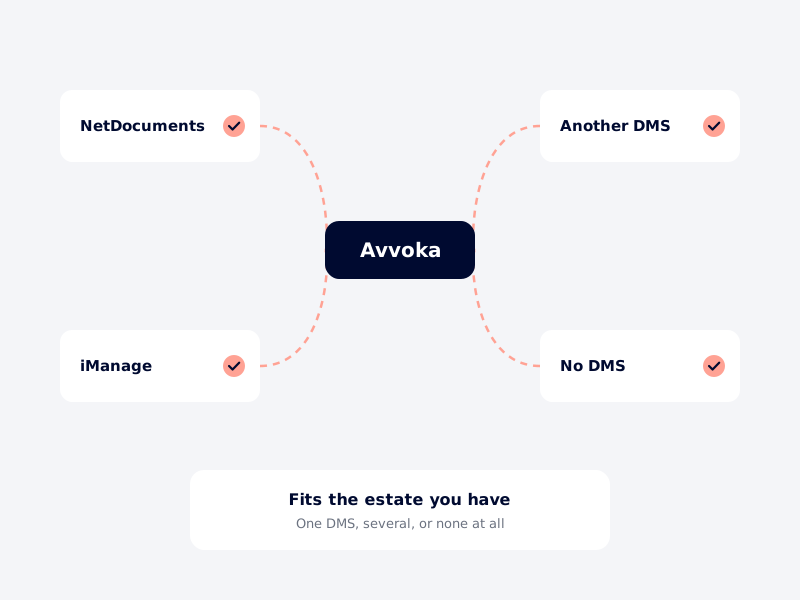
PatternBuilder is built into NetDocuments and only runs there. Avvoka is DMS-agnostic, so it fits firms on NetDocuments, a different DMS, or a mixed estate.
PatternBuilder
Native to NetDocuments; doesn't work independently of it.
Avvoka
DMS-agnostic; works with your systems rather than living inside one.
PatternBuilder's ndMAX runs on Azure OpenAI, but it lives inside NetDocuments. Avvoka's AI is built into drafting and negotiation, independent of any DMS.
PatternBuilder
ndMAX, built on Azure OpenAI, part of the NetDocuments ecosystem.
Avvoka
Built-in AI drafting, independent of any DMS.


PatternBuilder outputs a document to NetDocuments. Avvoka adds negotiation, redlining and analytics in the same workflow.
PatternBuilder
Negotiation isn't its focus.
Avvoka
Drafting, negotiation and analytics in one place.
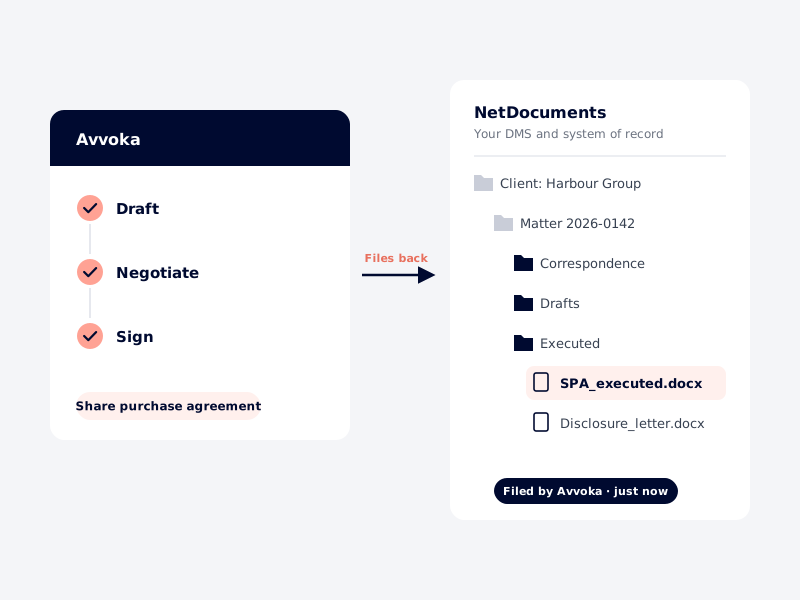
Keep NetDocuments as your DMS and system of record. Avvoka connects to it, so finished documents flow back into your existing matters and workspaces.
PatternBuilder
Best for straightforward, DMS-native generation.
Avvoka
Complementary. Add Avvoka as the automation and negotiation layer.
The honest view
PatternBuilder if…
—
NetDocuments is already your document platform and staying that way
—
You want automation living inside your DMS, inheriting its security model
—
Your needs are mostly generating a document and filing it
—
You're not looking to add negotiation or analytics to the same platform
Avvoka if…
—
You don't want automation tied to a single DMS vendor
—
You run a mixed environment, or might move off NetDocuments later
—
You want drafting, negotiation and analytics in one place
—
You want to negotiate with counterparties inside the tool
IF YOU DECIDE TO SWITCH
Add Avvoka, without the downtime
Your NetDocuments setup stays live the entire time. Keep PatternBuilder for straightforward generation, or move automations across one at a time once your team signs them off.
01 · DEMO
See it on your work
A 30-minute demo where we rebuild one of your document types in Avvoka.
No commitment.
02 · PROOF
Prove it on one template
Under NDA, our solutions engineers rebuild one of your PatternBuilder automations in Avvoka. There's no code to convert, so we rebuild it directly.
If it doesn’t meet your standard, you stop here.
03 · ROLLOUT
Roll out in parallel
Your highest-value automations move first. If NetDocuments stays your DMS, we scope that integration during the audit.
Users move across, template by template.
04 · SIGN-OFF
Sign off & expand
Each automation goes live only when your team approves it. Most migrations complete in 8-12 weeks.
You own the standard.
● THROUGHOUT
Your NetDocuments setup stays live from day one to cutover.
Nothing is at risk on cutover day. You switch when you're ready.
READY WHEN YOU ARE
Plan the switch on your terms
See Avvoka rebuild one of your own PatternBuilder automations and judge what changes.
FAQ
Will my existing PatternBuilder automations migrate?
Do I have to give up NetDocuments?
What hosting regions do you support?
Will our templates stay our IP?
What does Avvoka cost versus PatternBuilder?
How long does a typical migration take?
Built on Avvoka
of the AmLaw 100 draft on Avvoka
law firm retention over eight years
of documents drafted, zero hallucinations
ready to see it?
Thirty minutes. No commitment.
Choose a date.
Loading availability…