
Insights
Dev Template - Draft from your own templates inside Microsoft 365 Copilot
Models are a commodity. What isn't: the templates, precedents and judgement your firm has built up over years.
By
Kate Morrison
&
James Whitfield
Head of Knowledge Engineering
·
Product Lead, Drafting
Kate Morrison
Head of Knowledge Engineering
James Whitfield
Product Lead, Drafting
9 min read

FULL GUIDE · 48-PAGE PDF
Get the complete guide
Every chapter, checklist and worked example, ready to share with your team.
On this page
Key takeaways
Templates bundle legal logic and layout together, so every change has to be made in many places.
Headless drafting keeps the logic in one structured layer and renders it into any document or channel.
Knowledge teams spend less time on maintenance and more on improving the substance of their precedents.
For most of the last twenty years, the template has been the unit of legal automation. A firm takes its best precedent, adds some conditional logic, and publishes it as a smarter version of the same Word document. It works — until the firm has three hundred of them.
At that point, the template stops being an asset and starts being a liability. The same indemnity sits in forty documents with forty slightly different fallbacks. A regulatory change means a week of find-and-replace. And nobody is quite sure which version is the one the partners actually signed off.
The Avvoka connector for Microsoft 365 Copilot is now available, built on the Model Context Protocol.
Lawyers draft in Word, and increasingly with Microsoft 365 Copilot alongside them. With the Avvoka connector, Copilot can now draft from your own templates, your clause library and the logic your firm has agreed.
The connector uses the Model Context Protocol, the open standard Copilot uses to reach other systems to give Copilot a controlled route into your Avvoka workspace. An administrator enables it once, each user authenticates their own Avvoka account, and Avvoka becomes something Copilot can query and act through, inside the conversation the lawyer is already having.
Copilot brings the speed and the interface lawyers are already working in. Avvoka brings the drafting accuracy through the templates, logic and approved positions the firm has built. Together they cover a piece of legal work neither could complete alone.
For anyone already drafting alongside Copilot, it removes the round trip: no exporting a draft to check it against the precedent bank, no pasting a clause back in, no second window open to find the fallback the firm agreed last year.
What a lawyer can do
Draft from a firm template: Copilot works through the Avvoka questionnaire in conversation and Avvoka generates the document from your template's logic, so the output is accurate and follows your firm's rules.
Pull and amend an existing document: Retrieve something already in Avvoka, make the changes, keep them tracked.
Query the clause library: Ask for the approved position or the agreed fallback and get it, rather than reconstructing it from memory or from the last deal that looked similar.
Keep the work where it belongs: Everything lands back in Avvoka with the audit trail, permissions and version history intact.
PERMISSIONS
The connector inherits the permissions the user already has. If a lawyer can't see a matter in Avvoka, they can't reach it through Copilot either.
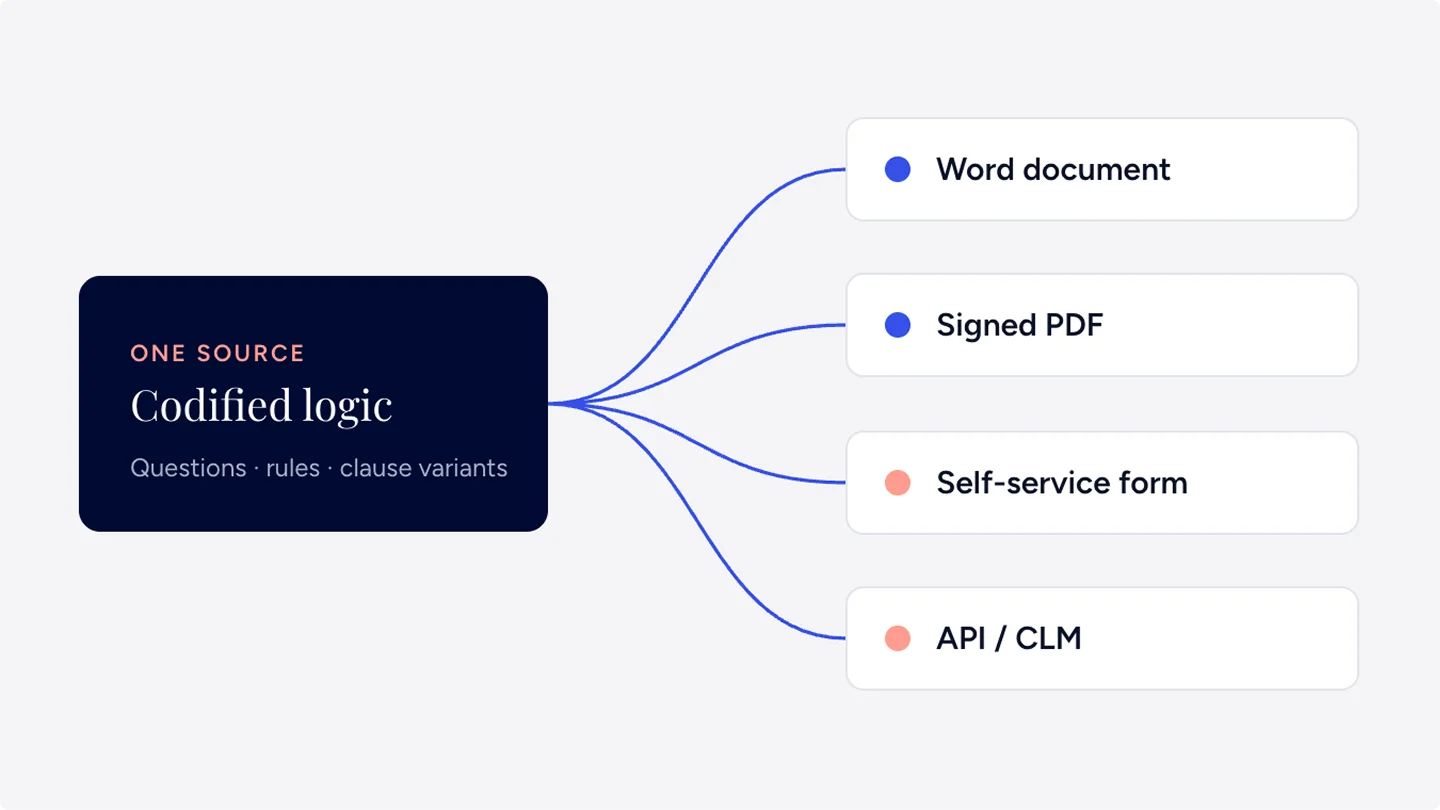
Logic is defined once and rendered wherever the work happens.
How it works in practice

“We implemented Avvoka to replace a legacy system with something more modern, adaptable, and designed to evolve over time.
Kate Morrison
,
Head of Knowledge Engineering
1.
Start in Word
The associate opens Word and asks Copilot to start the agreement.
2.
Answer the questionnaire
Copilot works through the Avvoka questionnaire in the chat, and Avvoka generates the draft from the firm's template: same logic, same approved wording that the knowledge team maintains.
3.
Check a fallback
Whilst drafting there's a question on drag-along thresholds. The associate asks Copilot, and the firm's approved fallback comes straight back from the clause library.
4.
Turn the markup
The counterparty's markup arrives on Tuesday. The associate pulls the document out of Avvoka, works through the changes, and it lands back with the version history intact.


A side-by-side comparison
|
| |
|---|---|---|
| Inside each document | One shared layer |
| Edit every template that uses it | Edit once, publish everywhere |
| Build a new template | Connect a new renderer |
| Version history per file | Change history per rule |
Key takeaways
Templates bundle legal logic and layout together, so every change has to be made in many places.
Headless drafting keeps the logic in one structured layer and renders it into any document or channel.
Knowledge teams spend less time on maintenance and more on improving the substance of their precedents.
For most of the last twenty years, the template has been the unit of legal automation. A firm takes its best precedent, adds some conditional logic, and publishes it as a smarter version of the same Word document. It works — until the firm has three hundred of them.
At that point, the template stops being an asset and starts being a liability. The same indemnity sits in forty documents with forty slightly different fallbacks. A regulatory change means a week of find-and-replace. And nobody is quite sure which version is the one the partners actually signed off.
The Avvoka connector for Microsoft 365 Copilot is now available, built on the Model Context Protocol.
Lawyers draft in Word, and increasingly with Microsoft 365 Copilot alongside them. With the Avvoka connector, Copilot can now draft from your own templates, your clause library and the logic your firm has agreed.
The connector uses the Model Context Protocol, the open standard Copilot uses to reach other systems to give Copilot a controlled route into your Avvoka workspace. An administrator enables it once, each user authenticates their own Avvoka account, and Avvoka becomes something Copilot can query and act through, inside the conversation the lawyer is already having.
Copilot brings the speed and the interface lawyers are already working in. Avvoka brings the drafting accuracy through the templates, logic and approved positions the firm has built. Together they cover a piece of legal work neither could complete alone.
For anyone already drafting alongside Copilot, it removes the round trip: no exporting a draft to check it against the precedent bank, no pasting a clause back in, no second window open to find the fallback the firm agreed last year.
What a lawyer can do
Draft from a firm template: Copilot works through the Avvoka questionnaire in conversation and Avvoka generates the document from your template's logic, so the output is accurate and follows your firm's rules.
Pull and amend an existing document: Retrieve something already in Avvoka, make the changes, keep them tracked.
Query the clause library: Ask for the approved position or the agreed fallback and get it, rather than reconstructing it from memory or from the last deal that looked similar.
Keep the work where it belongs: Everything lands back in Avvoka with the audit trail, permissions and version history intact.
PERMISSIONS
The connector inherits the permissions the user already has. If a lawyer can't see a matter in Avvoka, they can't reach it through Copilot either.
Logic is defined once and rendered wherever the work happens.
How it works in practice
“We implemented Avvoka to replace a legacy system with something more modern, adaptable, and designed to evolve over time.
Kate Morrison
,
Head of Knowledge Engineering
1.
Start in Word
The associate opens Word and asks Copilot to start the agreement.
2.
Answer the questionnaire
Copilot works through the Avvoka questionnaire in the chat, and Avvoka generates the draft from the firm's template: same logic, same approved wording that the knowledge team maintains.
3.
Check a fallback
Whilst drafting there's a question on drag-along thresholds. The associate asks Copilot, and the firm's approved fallback comes straight back from the clause library.
4.
Turn the markup
The counterparty's markup arrives on Tuesday. The associate pulls the document out of Avvoka, works through the changes, and it lands back with the version history intact.
A side-by-side comparison
|
| |
|---|---|---|
| Inside each document | One shared layer |
| Edit every template that uses it | Edit once, publish everywhere |
| Build a new template | Connect a new renderer |
| Version history per file | Change history per rule |
See headless drafting in Avvoka
A 30-minute walkthrough with our solutions team, using your own precedents.
Last Updated
Share this article
ABOUT THE AUTHORS
Kate Morrison
Head of Knowledge Engineering
Lorem Ipsum is simply dummy text of the printing and typesetting industry.Lorem Ipsum is simply dummy text of the printing and typesetting industry.
Kate Morrison
Head of Knowledge Engineering
Lorem Ipsum is simply dummy text of the printing and typesetting industry.Lorem Ipsum is simply dummy text of the printing and typesetting industry.
James Whitfield
Product Lead, Drafting
Lorem Ipsum is simply dummy text of the printing and typesetting industry.Lorem Ipsum is simply dummy text of the printing and typesetting industry.
James Whitfield
Product Lead, Drafting
Lorem Ipsum is simply dummy text of the printing and typesetting industry.Lorem Ipsum is simply dummy text of the printing and typesetting industry.
Related Articles




JOIN IN
Want more content Like this?
Sign up for our monthly newsletter, or see Avvoka in action with a live demo.